

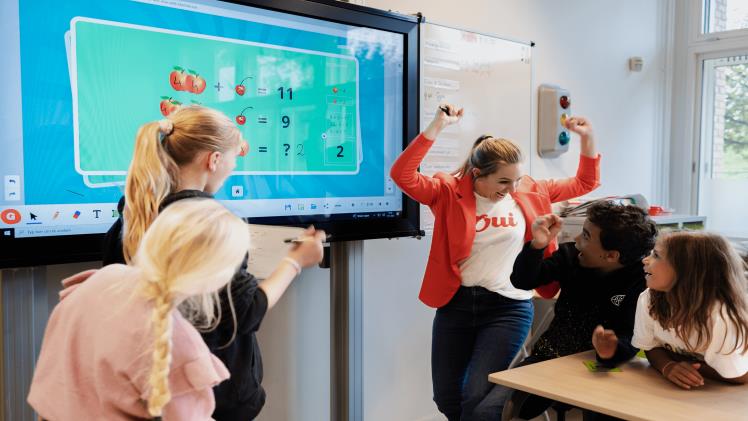
Educators today are struggling to help students escape two years of remote and disrupted education. Classroom tools such as interactive smart boards cannot eliminate all challenges, but they can help teachers increase engagement and bridge the gap between in-person and remote learning. Dozens of studies have shown that teaching with a smart whiteboard can enhance the learning process, increase student engagement and improve their knowledge retention.
ASANO 86-inch interactive display allow teachers and students to write intuitively using their finger, stylus or other writing implements, then save and share their work directly from the blackboard. With audio and video support, the touchscreen monitor can also access Internet or server-based content, making it easy to integrate into existing lesson plans. Here are eight ways you can use your interactive whiteboard to improve your classroom learning experience.

-
Stay Competitive in the Classroom
Many teachers want to know: Can the smart whiteboard be used as a whiteboard? Yes, thanks to its touchscreen functionality, teachers and students can draw or write equations, images or text directly on the surface. ASANO Interactive whiteboards support up to 20 touch points, so a group of students can work on the screen at the same time. They might compete to see who can solve an equation faster, or who can find a prepositional phrase first. This helps students test their learning outcomes in an easy and engaging manner.
-
Emphasize what matters
Teachers and students can highlight words, answers, photos – pretty much anything on the smart board. Teachers can highlight specific phrases as well as important facts. For example, you might ask students to highlight a misspelled word or highlight the correct answer to a question on the screen.
-
Take a virtual tour of a museum or historic site
One of the best ways to use a smartboard for teaching is to connect to the internet to play and display audio and video files. Teachers can use the browser to quickly query and interactively tour knowledge points while teaching transfer knowledge, or history professors can give virtual lectures on historical places without leaving the classroom.
-
Interactive whiteboard fill in the blanks
There are hundreds of websites for participating in math lessons—many of which were created specifically for use with interactive whiteboards. Websites such as Math Playground, Eduscapes, PBS Kids, and the National Library of Virtual Manipulations give you a starting point on how to use smartboards in the classroom. Anything you would normally print in class can be done on the whiteboard, no paper required.
-
Read a story and ask students to follow along
With Google Books, some of the world’s best books can be displayed directly on your interactive whiteboard. The built-in software is also set to search books by grade, play time, author and title. Additionally, many school districts may have access to e-books that teachers can download to their own devices and share to the interactive whiteboard screen so the whole class can see them.
-
Connect with remote students
When students are sick, absent from school, or unable to make it to school due to inclement weather, remote learning technology allows them to engage from home. Teachers can use the smart board’s video conferencing solution and real-time collaboration capabilities to support blended lessons. Teachers can push assignments to students in the classroom and remotely, and use digital learning assessments like polls and interactive questions.
Interactive boards have the potential to transform traditional classrooms into dynamic, engaging learning environments. However, successful implementation requires training for teachers to effectively leverage the technology and create meaningful learning experiences. ASANO interactive smart boards open up a world of options for teachers and students. When educators take advantage of all potential interactive whiteboard activities, they can create a productive learning environment that helps learners of all types stay engaged.
